
ProgrammingNov 8, 2026Trần Thế Phúc
ARDUINO TUTORIAL#1
#Arduino#Programming#Tutorial
SPECIFICATION & TECHNICAL NOTES
INTRODUCTION
To learn and use Arduino effectively, we need to understand and become familiar with several basic functions.
1. PinMode (pin, mode);
Function:
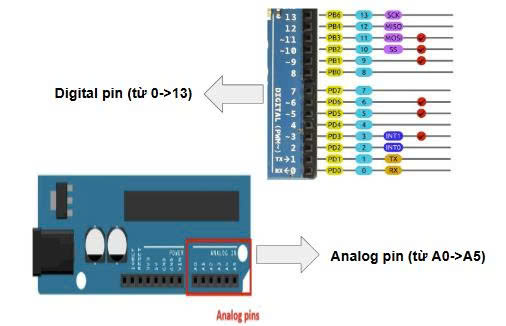
Configures a specified pin to operate as either an OUTPUT or an INPUT. Both digital and analog pins can be configured as inputs or outputs using this function.
// Syntax:
pinMode(pin, mode);
// Example:
pinMode(13, OUTPUT);
// Configures digital pin 13 as an OUTPUT.
Example
2. Delay (time);
Function:
Pauses the program for the specified duration (time). The unit oftimeis milliseconds (1 second = 1000 milliseconds).
// Syntax:
delay(time);
// Example:
delay(1000);
// Pauses the program for 1 second.
3. DigitalWrite (pin, value);
Function:
Sets a digital pin to either HIGH or LOW.
Possible values:
- HIGH (5V on a 5V board) – Sets the pin to a HIGH voltage level.
- LOW (0V) – Sets the pin to a LOW voltage level.
// Syntax:
digitalWrite(pin, value);
// Example 1:
digitalWrite(13, HIGH);
// Sets digital pin 13 to HIGH.
// Example 2:
digitalWrite(13, LOW);
// Sets digital pin 13 to LOW.
PRACTICE EXERCISE
Task:
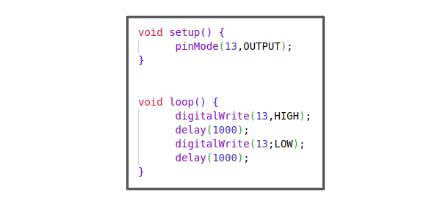
Using the knowledge of the three functions pinMode(), delay(), and digitalWrite(), write an Arduino program to perform the following task:
"Set digital pin 13 to HIGH for 1 second, then set it to LOW.”
Solution
Verified by FTC 31113 Technical LeadID: 4e8fea3a-c242-4025-8a5f-df1f8f94e641