
ProgrammingNov 8, 2026Trần Thế Phúc
AT#11: SERIAL COMMUNICATION
#Arduino#Serial#Communication#Debug
SPECIFICATION & TECHNICAL NOTES
BASIC SERIAL COMMANDS
1. Serial.begin(speed);
Function:
Initializes serial communication and sets the data transmission rate to speed bits per second (usually 9600).Location:
This command is placed inside the void setup() {} function.2. Serial.print(content);
Function:
Prints the specified content to the Serial Monitor without moving to a new line.Note:
You can use Serial.println(content); to print the content followed by a new line.PRACTICE EXERCISE: APPLY THE KNOWLEDGE ABOVE AND ENTER THE FOLLOWING COMMANDS
Serial Exercise Code
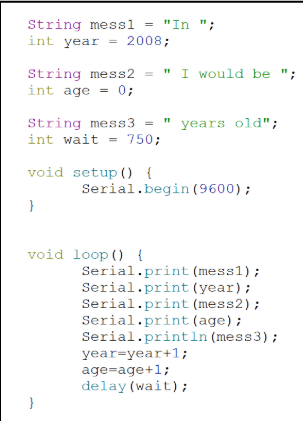
Example Code:
String mess1 = "In ";
int year = 2008;
String mess2 = " I would be ";
int age = 0;
String mess3 = " years old";
int wait = 750;
void setup() {
Serial.begin(9600);
}
void loop() {
Serial.print(mess1);
Serial.print(year);
Serial.print(mess2);
Serial.print(age);
Serial.println(mess3);
year = year + 1;
age = age + 1;
delay(wait);
}
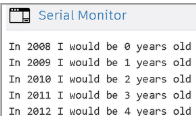
EXPECTED OUTPUT:
Serial Monitor Results
Verified by FTC 31113 Technical LeadID: 9813119f-532b-4d6e-9fb9-a44d8a2bfefd